

Pest Control Routing Software
Pest Control Routing Software: Territories, Anchors, and the Recurring Route
Pest control routing software is the system that builds and maintains the daily route for a recurring-service operation. It draws technician territories, turns service agreements into dated stops on their contract cadence, sequences each day around drive time and customer time windows, and re-solves the plan when a cancellation or add-on breaks it. Most tools layer GPS tracking, a technician mobile app, and customer ETA notifications on top of the optimizer.
By the time the optimizer runs, most of the route is already decided. A quarterly contract signed in March pins a stop to a week in June, another in September, another in December, months before anyone thinks about sequencing. Territory lines you drew two years ago decide which truck that stop can even land on. Routing a pest company means re-solving around standing commitments, inside boundaries the business set long before the software opened. Vendors describe routing as if every morning starts from a blank map. For a delivery fleet that is accurate. A pest operator's day is mostly committed in advance.
That difference shapes this guide. The sections cover how territories get designed and redrawn, how a route actually gets constructed (pinned anchors, dynamic fill, re-sequencing), what may move when the day breaks, and where standalone planners like OptimoRoute and Zeo fit next to routing inside your pest platform. One caveat before the sections. Every savings percentage on page one of this search result is vendor marketing. Where this guide uses numbers, they come from the U.S. Department of Energy and the academic vehicle-routing literature, and each one is linked.
Full disclosure: we build Dream, a CRM and ERP for pest control, built through deep collaboration with real pest control operations since 2012 and still founder-owned. Routing lives on the route planning and optimization software side of our platform, so we have a position here, and this guide still credits competitors where the facts earn it.
Route planning vs route optimization: two different jobs
Route planning is the weeks-out layer: which accounts belong to which territory, which day of the week a neighborhood gets serviced, how many trucks a branch runs, and where the recurring base leaves room for new work. Planning decisions live on a map and a calendar, and they change slowly.
Route optimization is the day-of math. Given these fourteen stops, this start point, these time windows, this truck, and this technician's licenses, produce the cheapest drivable order. Researchers call this the vehicle routing problem, or VRP, and it has been studied for decades. Toth and Vigo's standard reference on the subject puts the payoff plainly: computerized planning of distribution produces savings "generally from 5% to 20%" in total transportation costs (The Vehicle Routing Problem, SIAM). Treat that range as the canonical figure. When a vendor claims 30 or 40 percent without a source, you now know what to ask for.
Both jobs matter, and they compound in a specific order: planning sets the ceiling, optimization gets you close to it. A perfectly sequenced route through a badly drawn territory is still a bad route.
One boundary note before going deeper. How many stops fit in a day, route density, drive-time budgets, and the dispatch board are capacity questions, and we covered them in our pest control scheduling software guide. This post stays on construction: how the route gets built in the first place.
Pest control route planning starts with territory design
A territory is three decisions bundled together: a boundary, an anchor day, and a density target. North-of-the-river accounts belong to truck three, they get serviced on Tuesdays and Wednesdays, and the ring is tight enough that a tech's whole week stays inside it. Draw those lines well and density happens by design, because every recurring visit you sell inside the ring lands near the visits already there. Draw them badly and the optimizer cannot fix the result.
Territory design precedes software, and it has a shelf life. Four events force a redraw:
- Growth. Around the tenth truck, lines drawn at four trucks start to strain: rings overlap, techs cross paths, and the "temporary" out-of-territory stop becomes permanent.
- Acquisition. Buying a competitor means inheriting someone else's map, usually one that made sense for their office location and nobody else's.
- Branch splits. Opening a second branch turns one map question into two, plus a new question about which branch owns the accounts near the seam.
- Season. More on this below; the short version is that summer and winter call for different territory maps.
Mid-market operators carry constraints the SMB advice skips entirely. Branch boundaries have to hold, because a stop routed to the wrong branch bills and reports wrong. State licensing lines are hard walls: a technician certified in one state cannot take a termite job across the border, no matter how close it is. Equipment matters the same way, since a truck without the termite rig cannot take the job regardless of drive time. Routing software matters here because it makes the lines enforceable: geo-fencing to define the perimeters, and a map view that makes territory bleed visible before it becomes habit.
Draw the lines well and density happens by design.
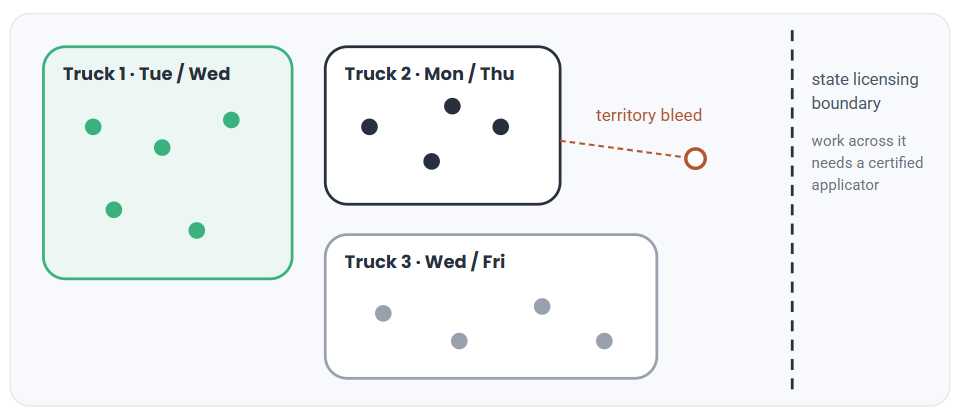
The optimizer sequences stops inside these lines; it cannot fix lines drawn badly. Map is illustrative.
How does a pest control route actually get built?
Construction runs in three layers, in exactly this order.
Layer one: pinned anchors. Recurring contract stops due in the current window land first. A bimonthly account due this week goes on its anchor day, in its territory, with its usual technician where the contract expects one. Good software generates these stops from the agreement itself, so a change to the contract changes the calendar. Weaker tools use a repeating template that drifts from the contract until someone audits it by hand.
Layer two: dynamic fill. One-time work slots into the room the anchors leave: new-sale initial services, callbacks, inspections, follow-up treatments. Fill should gravitate to the nearest gap, so a callback in truck three's territory lands on truck three's lightest anchor day instead of wherever the calendar happened to have white space.
Layer three: re-sequencing. With the day's stops set, the optimizer orders them: drive time, customer time windows, skill and license match, vehicle capacity. The output is a drivable sequence pushed to the technician's mobile app, with ETA notifications going to customers off the same plan.
Anchors land first, fill takes the gaps, then the optimizer sequences the day.


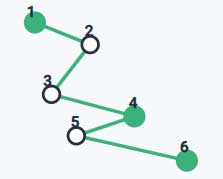
Green stops are contract anchors; outlined stops are fill. The sequence is what the technician drives. Stops are illustrative.
Failure shows up at the extremes. Tools that treat every stop as fill turn recurring service into a template-maintenance chore, and cadence errors follow. Tools that lock everything leave no room for fill, and the new-sale initial you promised for Thursday ends up forty minutes off-route.
Why route optimization for pest control differs from delivery routing
A parcel optimizer gets 150 new stops each morning and full freedom to order them. Pest routing hands the solver a day that is mostly spoken for, and each visit date constrains the ones after it. Service the quarterly in the second week of June and the next visit is due mid-September, which becomes a constraint on a route nobody has built yet. Route optimization for pest control is a constrained re-solve, and the constraints come from the business: cadences, territories, licenses, time windows, equipment.
Fuel and drive time still carry real money. The Department of Energy's data puts the cost of ragged driving at 15 to 30 percent of gas mileage at highway speeds and 10 to 40 percent in stop-and-go traffic, with idling burning a quarter to a half gallon of fuel per hour (fueleconomy.gov). Across the economy, Argonne National Laboratory estimates more than 6 billion gallons and over $11 billion lost to idling every year (Alternative Fuels Data Center). A loose route incurs a share of those costs every day, on every truck.
A cadence miss costs more. Skip a quarterly and you have a contract out of compliance, a customer with a reason to cancel, and a make-up visit crammed into a week that was already full. Delivery optimizers minimize miles; pest routing has to keep commitments first and minimize miles second. Modern solvers can hold hundreds of constraints at once, which is why it makes sense to hand the solver more of the re-solving work a dispatcher currently does from memory.
Same-day breakage: what may move and what stays pinned
Every route plan meets a 9:40 cancellation, a lunchtime add-on, or a no-show at a locked gate. Re-solving in real-time only works if the rules are explicit, because some stops must hold no matter how the map re-shuffles.
Stays pinned: stops with committed time windows, work assigned by license or skill (the termite job stays with the certified applicator), and anchor stops at their cadence deadline. A quarterly due by Friday cannot slide to next month because a gap opened across town.
May move: un-windowed fill, the drive order of everything remaining, and tomorrow's fill jobs, which can trade places with today's when that closes a gap.
Map-based tools handle this far better than list-based ones. In Dream's visual route manager, every scheduled job is a pin; the dispatcher reassigns work straight off the pin and the sequence rebuilds around the change. GPS tracking closes the loop afterward by showing the route a tech actually drove against the one the plan suggested, which is where you find the breakage patterns worth fixing. The dispatch side of this workflow, boards, statuses, and who moves what, lives on our dispatching and scheduling software page.
Season changes the map, and re-sequencing days will not absorb it
Spring stacks the calendar with one-time work: termite swarm calls, mosquito starts, a surge of new-sale initials. Winter thins the map back toward the recurring base and commercial accounts. Operators feel this as routes that made sense in February overflowing by May, and the reflexive fix is day-level re-sequencing, squeezing more stops into the same rings.
Squeezing is the wrong layer. Surge volume changes where density lives, so the fix is a seasonal redraw: split the dense summer territories, staff routes up for the surge, then collapse the map again in fall. Software should make this a boundary edit with visible consequences. Dream's optimizer weighs vehicle capacity, travel time, and transportation cost when routes rebuild, so a proposed split can be judged on cost before anyone commits a truck to it. If your routing tool makes a territory redraw feel like a migration project, you will skip the redraw and spend the season re-sequencing overloaded days by hand.
Standalone route planners vs routing inside your pest platform
Shopping for pest control route optimization software really means choosing between two classes. Standalone planners (OptimoRoute, Zeo) are routing specialists: strong VRP solving, driver apps, and published per-driver pricing. OptimoRoute lists $35.10 per driver per month on its Lite tier and $44.10 on Pro with annual billing; Zeo sells per-driver seats, with fleet plans around $599 per driver per year. Pest platforms (PestPac, FieldRoutes, Briostack, Dream) build routing against the customer record and quote custom, priced by technician count and modules.
The trade is records for price. A standalone planner routes the stops you feed it, and it routes them well. Contracts, cadences, branch assignments, licenses, and balances all live somewhere else, so someone exports stops in and imports results out, every working day. At three trucks that round trip is a tolerable chore. At fifteen trucks across two branches it is a part-time job with an error rate.
| Software | Class | Routing strengths | Where it stops |
|---|---|---|---|
| ✅ Dream | Pest-native CRM + ERP platform | Routing inside the ERP, not a paid add-on: visual route manager with jobs as map pins, reassignment from the pin, geo-fencing; optimization weighs vehicle capacity, travel time, and transportation cost; the route reads the contract and branch off one record | Built for mid-market operators; potentially more than what a solo shop needs |
| PestPac (WorkWave) | Mid-market incumbent | Established feature catalog at multi-branch scale | Route optimization is a paid add-on and pricing grows module by module; service has slipped since the 2021 private-equity acquisition |
| FieldRoutes (ServiceTitan) | Field-first cloud platform | Routing at scale for large residential door-to-door operators | Priced above the mid-market band (operators evaluating it report quotes around $2,500 to $3,000 a month at the $7M-revenue mark); roadmap follows ServiceTitan portfolio priorities |
| Briostack | Pest-specific platform | Pest-native routing with GPS tracking and customer notifications | Smaller footprint than the incumbents; thin on the link from the route back to the contract; test multi-branch depth in the demo |
| OptimoRoute | Standalone route planner | VRP solving with time windows; published pricing from $35.10 per driver per month | Holds no customer records — cadence, licensing, and balances move by daily export and import |
| Zeo | Standalone route planner | Driver-first mobile apps; per-driver seats around $599 per driver per year on fleet plans | Same boundary: it routes the stops it is given, and the contracts live elsewhere |
A fair comparison judges each class on its own claim. The standalone planners never promised contract handling, and for a pest operation the records are the constraints: a solver that cannot see cadence, licenses, or balances is optimizing the wrong problem. Disconnected records cost more than any difference in raw solving.
What happens when routing runs outside the customer record?
Everything pest-specific about a stop lives in the customer record: the cadence, the contract terms, the branch, the balance owed, the chemical history, the license the work requires. A standalone planner works from coordinates and windows because that is all it holds. When routing runs in one tool and records live in another, every day starts with an export and an import, and data gets dropped in the transfer.
Predictable failures follow. Stops get serviced off-cadence because the export reflected last month's contract. A technician gets routed across a licensing line the planner has no field for. Past-due accounts get a fresh service because the balance never made the trip between systems. None of these are solver errors; each one is a records gap.
Platform routing closes the gap by construction. In Dream, the sale entered in the pest control CRM sets the cadence, the cadence pins the anchors, and the anchors build the route, one record end to end. It comes down to one decision: keep routing and records in the same system, or budget real hours for the export and import work between them.
What to make a routing vendor prove
Prepare before the demo. Bring these five tests and you will rule vendors in or out fast.
- Bring 50 real accounts, quarterlies included. Watch the system generate dated stops from the contract cadence. A repeating calendar template creates ongoing hand maintenance, whatever the vendor calls it.
- Cancel a mid-morning stop live. Watch the re-solve, then ask what stayed locked and why. Vague answers here become dispatcher improvisation later.
- Redraw one territory line. Ask what happens to stops already due next week inside the moved boundary.
- Ask the multi-branch questions. Branch boundaries, state licensing lines, equipment loads. Listen for whether the answers are fields in the product or workarounds in a spreadsheet.
- Ask them to source their savings number. The routing literature supports 5 to 20 percent of transportation costs. A vendor claiming double owes you the study.
FAQ
What is pest control routing software?
Software that builds and maintains technician routes for recurring pest service. It generates dated stops from contract cadences, sequences each day around drive time and time windows, re-solves same-day changes, and adds GPS tracking, a technician mobile app, and customer ETA notifications. It comes standalone or built into a pest platform.
What's the difference between route planning and route optimization?
Route planning is the weeks-out layer: territory boundaries, anchor days, and truck counts. Route optimization is the day-of math that sequences a given set of stops for drive time, time windows, and skill match. Planning sets the ceiling on route quality; optimization gets each day close to that ceiling.
Can routing software handle recurring quarterly or bimonthly contracts automatically?
Pest platforms generate dated stops from the agreement itself, so a contract change updates the route plan. Standalone planners support recurring orders but hold no contracts, so cadence data arrives by import and drifts when it is stale. Test this live: change a cadence and watch what the calendar does.
Should I use a standalone route planner like OptimoRoute or Zeo with my pest control software?
A standalone planner only routes the stops you feed it. Contracts, licenses, and balances live outside it, so every day starts with an export and ends with an import, and the planner cannot see the constraints that matter most in pest work. Routing inside the platform reads the contract directly, which is why operators running real route volume keep it there.
How much time and fuel does route optimization actually save?
Peer-reviewed routing research puts computerized route planning at 5 to 20 percent of total transportation costs. DOE data adds context: stop-and-go driving can cut gas mileage 10 to 40 percent, and idling burns up to half a gallon per hour. Treat larger unsourced vendor percentages as marketing until proven on your stops.
What happens when there's a same-day cancellation or add-on?
Good software re-optimizes in real-time within explicit rules: time-window commitments, license-matched assignments, and cadence-deadline anchors stay pinned, while un-windowed fill re-sequences around the change. Map-based tools let the dispatcher reassign from the stop's pin, and the drive order rebuilds without breaking any locked commitment.
How do I design pest control territories?
Set a boundary a technician can cover in a week, assign anchor days so recurring visits cluster by neighborhood, and hold a density target per ring. Respect branch boundaries and state licensing lines. Redraw at growth milestones, acquisitions, branch splits, and season changes; territory lines go out of date quickly.
How much does pest control routing software cost?
Standalone planners publish per-driver pricing: OptimoRoute runs $35.10 to $44.10 per driver per month on annual billing, and Zeo's fleet plans land near $599 per driver per year. Pest platforms including routing quote custom by technician count and modules; expect the figure to scale with trucks and branches.
Before you demo anything, do one free exercise this week: pull last week's GPS tracks onto a map next to your territory lines. Every place the tracks cross a boundary is drive time that re-sequencing will not fix, because the problem is in the territory lines, not the stop order. Fix the lines first, then make the software defend them.
To see routes built from the contract record end to end, book a 30-minute Dream demo and bring that map.