Pest Control Business Software
Pest Control Business Software: How to Choose the Platform to Run Your Whole Operation
Pest control business software is the system a company uses to run the whole operation: sales and CRM, scheduling and routing, billing and invoicing, the technician mobile app, the customer portal, and the reporting that ties it together. For a mid-market operator, the real question goes past which features exist. What matters is whether one platform runs the business or a stack of point tools does, and what it costs to switch.
With one truck, the software question is easy: pick a cheap app and start booking jobs. At 80 technicians across three branches it changes shape. What matters now is whether reporting rolls up across branches, whether a shared technician can be routed without double-booking, and what it costs to move off a system you have outgrown. The starter checklists never test any of that.
At this scale, the failures that hurt happen between systems, not inside any one of them. Pest control software for mid-market operators has to hold multiple branches, a shared field team, and a real book of recurring revenue on one record. When a shared tech gets double-booked because one branch's schedule never shows the other's stops, that is the platform gap showing, and no single feature closes it. Good software for pest control business operations at this size gets judged on that, well before you sign.
The must-run capabilities in pest control software for business
Before comparing vendors, get clear on what the software has to do. Score each vendor on how well it does the job below, not whether the box is checked. Every capability here is table stakes for a mid-market operation.
- CRM and sales: lead capture, quoting, and a customer record that the whole company shares.
- Scheduling and dispatch: recurring service plans on quarterly, bi-monthly, and monthly cadences, plus same-day changes.
- Route optimization: drive-time-aware sequencing so a technician is not crossing town twice.
- Billing and invoicing: autopay on recurring plans, failed-payment recovery, and clean AR.
- Mobile app: an offline-capable field app for service records, photos, and payments at the door.
- Customer portal: self-service booking, payment, and history.
- Reporting: dashboards that roll up across branches, not just one location.
- Integrations: an accounting link such as QuickBooks, payment processing, and an open API.
- Compliance: chemical and pesticide logging, WDO reporting, the NPMA-33 on real-estate deals, and warranty tracking on termite work.
Any tool that handles four of these well and leaves the rest to spreadsheets is a starting point, and it usually gets replaced at the second branch or the first acquisition.
Point tools or one platform, and where the line falls
Every growing operator hits the same fork. You can run the business on separate best-of-breed tools, one for scheduling, one for billing, one for marketing, stitched together with integrations. Or you can run it on one platform where those functions share a single record. You feel that choice in the office: whether a payment posts back to the job on its own, or whether someone reconciles it by hand on Friday.
On the first invoice, point tools look cheaper. Hidden costs show up in the seams: a CSR re-keys the same customer into three systems, a payment in the billing tool never ties back to the service record, and a report means exporting from four places into a spreadsheet on Friday. Each integration is one more thing that breaks during a busy week.
| Decision factor | Point tools (separate apps) | One platform |
|---|---|---|
| Customer record | Duplicated across apps, re-keyed by hand | Single shared record |
| Billing and service | Payments not tied to the job | Invoicing tied to the service record |
| Reporting | Manual export and merge | Multi-branch rollup built in |
| Recurring plans | Managed per app | Managed once, everywhere |
| Adding a branch | New setup in every tool | One configuration |
| Total cost | Low sticker, high labor | Higher sticker, lower labor |
Here is where I would draw the line. Under about 15 technicians and one location, point tools are fine, and forcing a full platform on a small shop wastes money. Strain shows up with growth: a second branch, a shared crew, a book of business from an acquisition, or WDO work that needs real compliance records. Past that point, the labor of holding separate systems together costs more than the platform you were avoiding, every time. Incumbents that dominate the mid-market got there for exactly this reason. Operators gripe that one of them nickel-and-dimes every text message and extra branch, and they stay anyway, because at scale one system beats five tools held together by a CSR and a spreadsheet.
The one-record test
Tracing a single customer end to end is the fastest way to tell a real platform from a bundle of apps. Book the call, run the service, send the invoice, process the renewal. On one platform, that customer stays one record the whole way, so the CSR who answers the next call sees the service history, the open balance, and the last technician's notes on one screen.
Run the same trace across point tools and the record splits apart. Booking lives in the scheduling app, the balance in the billing app, and the marketing history somewhere else again. Nobody holds the full picture without opening three tabs, and the customer feels it when they have to re-explain their own account. Multiply that by every call an 80-technician operation takes in a week, and the split record is costing you real hours every day.
Have a vendor pull up the customer record during a demo. A sound data model shows service, billing, and communication history in one view. If the answer involves switching apps, you are looking at point tools behind a shared login.
Best pest control software for a multi-branch operation
Most published rankings are built for shops with one to fifteen technicians. Fine at that size. They fall apart once you run multiple branches, because they never test what breaks at scale.
A mid-market operator needs answers the starter guides do not cover. Can the platform draw territory and route across branch boundaries without double-booking a shared technician? Does reporting roll up to a regional and company view, or does each branch export its own numbers? Can you set a recurring service catalog once and apply it everywhere, or is every branch its own island? When you acquire a competitor, how fast can you fold their book of business in?
Acquisitions make that last one concrete. Buy a competitor with 1,200 accounts on a different system, and the platform either absorbs that book in weeks or you run two offices on two systems for a year while a migration limps along. Mid-market growth is often acquisition growth, so how fast a book folds in decides whether the deal pays off in the first quarter or drags.
Route density is the number that pays for all of it. One platform rebalances stops per tech across branches from a single schedule; four exported spreadsheets never will, so one branch runs slammed while another sends half-full trucks out.
On the left, three branches feed one shared customer record that produces a company rollup. On the right, the same three branches feed separate scheduling, billing, and marketing tools that only combine through a manual spreadsheet.
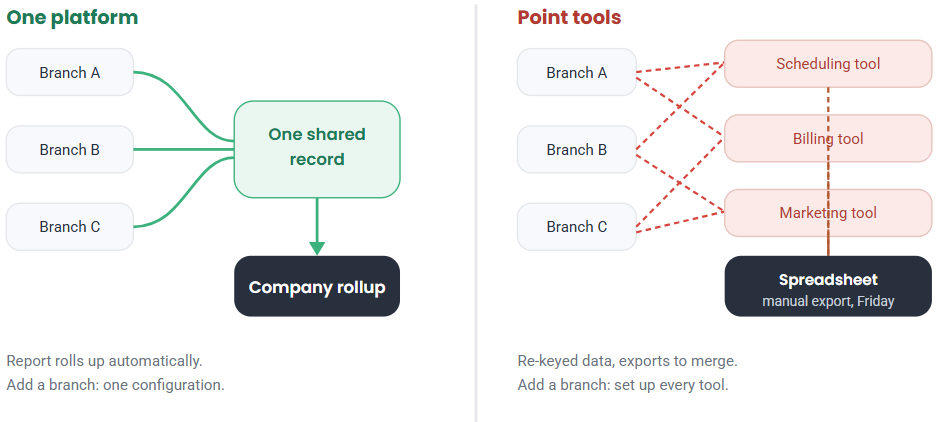
Illustrative. Tool set varies by operation.
What pest control business software costs, and the total cost of ownership
Pricing for this category rarely sits on the vendor's website, which usually means it is quoted per technician after a scoping call. Cheaper tools advertise low monthly entry rates because they are built for small shops. Mid-market platforms price per technician or per module, and the add-on line items, such as texting, card surcharges, and extra branches, are where the real bill takes shape.
Sticker price is the wrong number to optimize on. What counts is total cost of ownership: the software fee plus the labor to run it. A cheaper tool that forces two office staff to re-key data and rebuild reports every week costs more than a pricier platform that removes that work. When you compare quotes, add the fully loaded cost of the people holding the seams together, then compare platforms on that basis.
Modular pricing deserves a second look at the mid-market. Some platforms let you turn on CRM and scheduling first, then add billing or a customer portal as you grow, which spreads the investment over time. One quoted number can hide whether you are buying the whole platform or a starter tier that climbs as you switch on what you actually need. Ask for the per-module breakdown and the price at full deployment, so the figure you compare is the price you will pay in year two. The introductory rate rarely reflects what you will actually run.
What it really costs to migrate off a legacy platform
By far the most common reason operators stay on software they have outgrown is the fear of moving. It is a fair fear, and most vendors gloss over it. Real migrations move customers, recurring service agreements, service history, open AR, and documents, and they keep billing running the whole time.
Push any platform you evaluate to walk through the migration in detail. Who maps the data, how long does a typical cutover take for an operation your size, what happens to in-flight recurring plans, and how is open AR reconciled after go-live? A vendor that has done this for mid-market operators will have a clear answer. A vendor that waves the question away has not done it before. The switching cost is real, and so is the cost of staying on a system that burns office hours every week, though that one never shows up as an invoice.
How to evaluate pest control software for 80 or more technicians
At the mid-market, run the evaluation on your own operation rather than a canned demo. Bring your real data and your hardest week.
- Load a real branch. Ask to see your own customer list, routes, and recurring plans in the system, not a sample dataset.
- Break a day on purpose. Cancel a stop, add an emergency, and watch how the schedule and route re-solve.
- Run a failed payment. Confirm the platform detects a declined card, retries it, and ties recovery back to the account.
- Pull a company report. Ask for a rollup across branches without an export, then drill into one branch.
- Trace one record end to end. Follow a customer from a booked call through service, invoicing, and renewal to confirm it stays one record.
- Check the integrations both ways. Confirm the accounting link such as QuickBooks, payment processing, and the API actually move data in both directions, not just export a report you re-import by hand.
- Price the whole thing. Get per-technician and per-module pricing, plus the migration quote, so you can compare total cost of ownership.
Score each platform on how it handled your data and your broken day, and keep the notes. That tells you far more than a feature matrix, and the notes become the punch list you take back to each vendor.
Once you have chosen: running the operation
Picking a platform is one job. Running it well is another, from territory design to dispatch to closing the books each month. We cover that operational side in the pest control management software guide, and the function-level depth lives in the scheduling, route optimization, billing and invoicing, and CRM guides.
FAQ: pest control business software questions
What is pest control business software?
Pest control business software is the system a company uses to run the whole operation, including CRM, scheduling, routing, billing and invoicing, a mobile app, a customer portal, and reporting. For a mid-market operator, it usually means one platform that shares a single customer record rather than a stack of separate point tools.
How much does pest control business software cost?
The cheapest tools advertise low monthly rates, while mid-market platforms price per technician or per module and quote after scoping. The number that matters is total cost of ownership, which adds the labor to run the software to the fee itself, so a cheaper tool that forces manual re-keying can cost more.
What is the difference between point tools and one platform?
Point tools are separate apps for scheduling, billing, and marketing, connected by integrations. One platform runs those functions on a shared record. Point tools look cheaper up front but add manual work and broken handoffs, and one platform costs more in software and less in labor, which usually wins above 15 technicians.
What is the best pest control software for a mid-market operation?
The best pest control software for a mid-market operator is the platform that handles multi-branch reporting, recurring plans, and migration well on your own data. Weigh the mid-market platforms, including Dream, PestPac, FieldRoutes, Briostack, and Evolve, by loading a real branch rather than trusting a feature list.
How hard is it to switch pest control software?
Migration moves customers, recurring agreements, service history, and open AR while billing keeps running, so it takes real planning. Ask any vendor how they map data, how long cutover takes for your size, and how open AR is reconciled after go-live. A vendor experienced with mid-market operators will have a clear plan.
Does pest control business software handle compliance and multi-branch reporting?
A mid-market platform should log chemical and pesticide use, support WDO reporting and warranty tracking, and roll reporting up across branches into a company view. Confirm both in the demo with your own data, since these are the areas the lightest tools most often leave to spreadsheets.
Choose on your data, not a feature list
The right pest control business software is the one that runs your whole operation on a single record and proves it on your hardest week. Load your own branch into two finalists, break a real day on each, and price the switch on total cost of ownership. Whichever one holds up on your data is the one to buy.
When you are ready to test a platform against your own branches and routes, book a 30-minute demo. We will run it on your real data, and you can watch a shared tech get routed across two branches without a double-booking.